









What is Dotloop Used For? A Real Estate Pro's Guide to Closing Deals Faster
Real estate transactions are complex, involving dozens of documents, multiple parties, and strict deadlines. For agents and brokers, managing this process efficiently is the key to success. This is where a tool like Dotloop comes in, and understanding what is dotloop used for is the first step toward streamlining your entire workflow. At its core, Dotloop is a comprehensive real estate transaction management platform designed to move deals from listing to close entirely online.
It acts as a central hub where agents, clients, lenders, and other stakeholders can collaborate on documents, sign contracts electronically, and track progress in real-time. Instead of chasing down physical signatures, scanning piles of paper, and managing endless email chains, Dotloop brings every piece of the transaction into a single, secure digital workspace. This shift not only saves time but also enhances compliance and improves the overall client experience.
In a Nutshell
- Centralized Platform: Dotloop is a cloud-based software for managing every stage of a real estate transaction online, from initial offer to final closing.
- Core Purpose: Its main function is to replace traditional paperwork with digital documents, legally binding e-signatures, and automated, collaborative workflows.
- Key Features: The platform includes interactive document editing, secure e-signing, robust compliance tracking, task management, and a full-featured mobile app for on-the-go access.
- Collaboration Hub: It creates a single workspace, called a "loop," that centralizes communication and tasks for agents, brokers, clients, and all other parties involved in a deal.
What is Dotloop Used For? A Deep Dive into Its Core Purpose
The fundamental dotloop purpose is to solve the biggest challenges in real estate transactions: disorganization, delays, and compliance risks. Before platforms like Dotloop, a single deal could generate a mountain of paperwork that had to be printed, signed, scanned, and emailed back and forth. This manual process was not only inefficient but also prone to errors, lost documents, and version control nightmares.
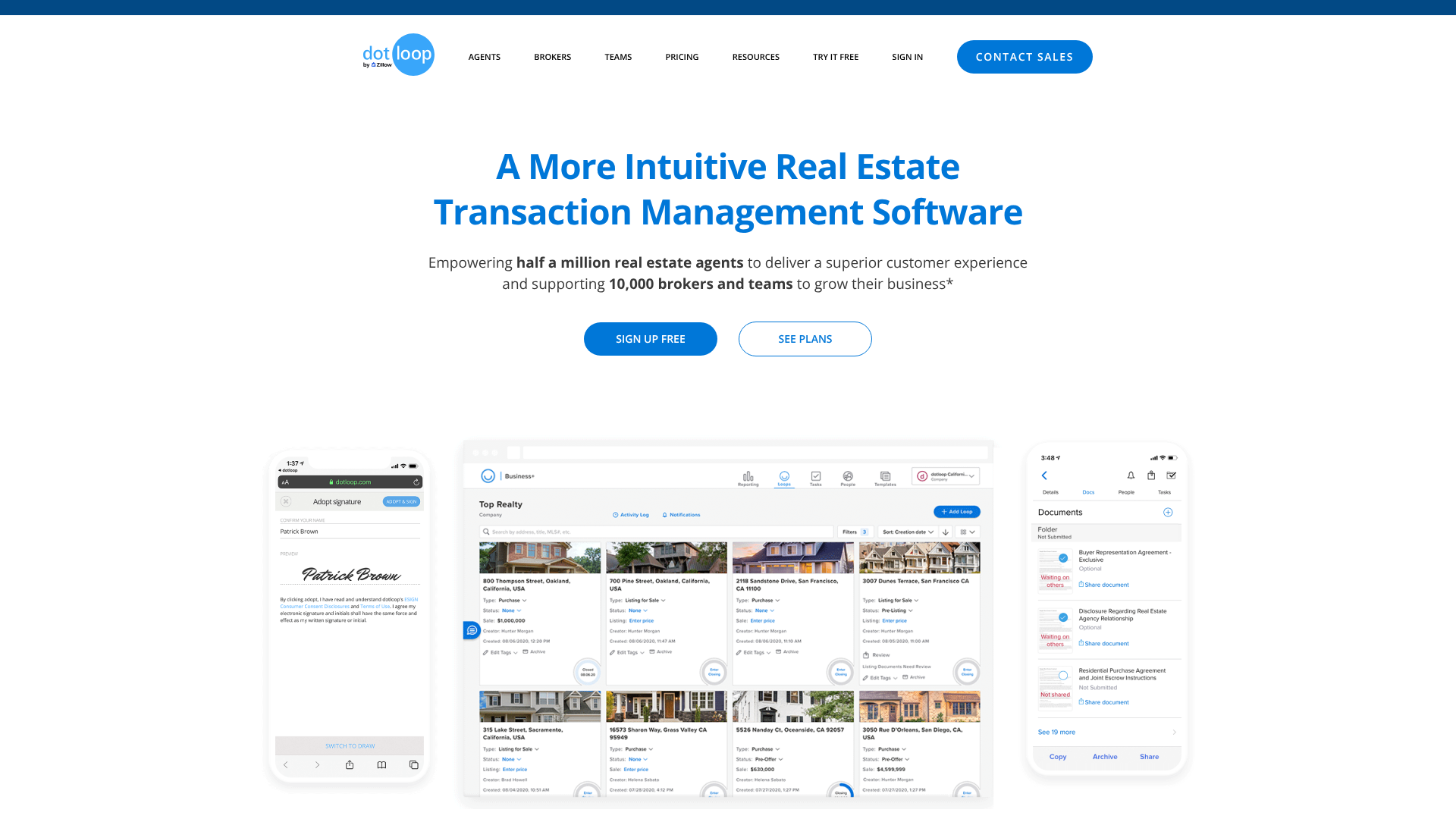
Dotloop addresses this by creating a unique digital workspace for each transaction, which it calls a "loop." Think of a loop as an intelligent, online file folder for a specific property deal. Inside this loop, you can store every necessary document, from the listing agreement and purchase offer to inspection reports and closing disclosures. This immediately organizes the transaction and makes every file accessible to authorized parties from any device with an internet connection.
Beyond simple storage, the platform's primary use is active transaction management. It transforms static PDFs into interactive documents that can be filled out, edited, and signed electronically. This eliminates the need for clients to print documents or come into an office just to sign a form. The entire process can be completed in minutes from a smartphone or computer, dramatically speeding up the timeline and removing logistical hurdles.
Furthermore, Dotloop is built with compliance at its core. For brokers, one of the most critical dotloop uses is overseeing their agents' activities to ensure all legal and procedural requirements are met. The platform creates an unchangeable audit trail, logging every action taken on a document—who viewed it, who edited it, and when and where they signed it. This provides an invaluable record for compliance reviews and dispute resolution.




Key Features and Benefits: How Dotloop Streamlines Real Estate Deals
Understanding what does dotloop do is best achieved by examining its core features. Each component is designed to address a specific pain point in the real estate transaction lifecycle, working together to create a more efficient and transparent process for everyone involved.
The "Loop": Your Central Transaction Workspace
A loop is the heart of the Dotloop system. When you start a new transaction, you create a loop and give it a name, often the property address. Within this secure space, you add all the people involved (buyers, sellers, co-op agent, lender, title officer) and all the relevant documents. Everyone you invite can access the files you share with them, receive real-time updates, and collaborate within a single environment. This prevents crucial information from getting lost in separate email threads or text messages.
Interactive Document Editing & Templates
Dotloop allows you to upload any PDF and turn it into an interactive form. You can add fields for signatures, initials, dates, and text boxes. The real power, however, comes from its template library. Many real estate associations and brokerages provide pre-loaded, compliant contract templates. With features like autofill, you can enter information like a client's name or property address once, and Dotloop will automatically populate it across all other documents in the loop, saving significant time and reducing the risk of typos.
Legally Binding E-Signatures
One of the most critical features is its built-in e-signature technology. Dotloop's signatures are legally binding and comply with the U.S. Electronic Signatures in Global and National Commerce (ESIGN) Act and the Uniform Electronic Transactions Act (UETA). This means that documents signed within Dotloop carry the same legal weight as those signed with pen and paper. The platform captures a detailed record of the signing event, including the time, date, and IP address, providing a secure and verifiable signature certificate for every document.
Task Management & Automated Workflows
Staying on top of deadlines is crucial in real estate. Dotloop includes task lists and workflow templates that help agents and transaction coordinators manage every step of the process. You can create custom checklists for different transaction types (e.g., buyer-side, seller-side, lease) and assign tasks to different people in the loop. The system sends automatic reminders for upcoming deadlines, ensuring that important milestones like inspection contingencies and financing approvals are never missed.
Brokerage Compliance & Audit Trails
For brokers, Dotloop is an essential compliance tool. It provides a centralized dashboard to review and approve agent documents, ensuring all paperwork is complete and correct before closing. The comprehensive audit trail, called the "Activity Log," records every single action taken within a loop. This detailed history is invaluable during audits and provides a clear, chronological record of the entire transaction, protecting the brokerage from potential legal issues.
Pro Tip: Customize your notification settings. Dotloop can send you an email or push notification for almost every action. To avoid being overwhelmed, go into your settings and select notifications for only the most critical events, like when a document is signed or a task is due.
Mobile Accessibility
Real estate agents are rarely tied to a desk. The Dotloop mobile app (for iOS and Android) provides full functionality on the go. Agents can create loops, draft offers, edit documents, request signatures, and check on the status of a deal from their smartphone or tablet. This flexibility is powerful; you can get a contract signed while at an open house or submit an offer for review immediately after a client meeting, giving you a competitive edge in fast-moving markets.
Dotloop Plans: Choosing the Right Option for Your Needs
Dotloop offers several plans tailored to different types of real estate professionals, from individual agents to large, multi-office brokerages. Choosing the right one depends on your business size, workflow needs, and compliance requirements. While specific offerings may evolve, the structure generally caters to three main user groups.
Dotloop for Agents (Premium)
This is the flagship product for individual real estate agents. The Premium plan provides all the core transaction management tools needed to run a successful business. This includes an unlimited number of loops, secure e-signing, a robust document editor, access to the mobile app, and task management features. It also offers integrations with other popular real estate software like CRMs and accounting tools. This plan is ideal for solo agents or those whose brokerage does not provide a transaction management solution.
Dotloop for Teams
Designed for real estate teams, this plan includes all the features of the agent plan plus enhanced tools for collaboration and oversight. A team lead can manage transactions for the entire team from a single dashboard, create standardized document and task templates for everyone to use, and control branding across all communications. This ensures consistency and efficiency, allowing team members to collaborate on deals while the team leader maintains visibility into the pipeline and performance. It's a perfect middle ground for growing teams that need more structure than a single agent account can offer.
Dotloop for Brokers (Business+)
This is the most comprehensive solution, built for brokerages that need advanced compliance and management capabilities. The Business+ plan provides brokers with complete oversight of every transaction occurring within their firm. Key features include a multi-level compliance review workflow, customizable reporting and analytics, agent onboarding and management tools, and company-wide branding controls. This plan helps brokers enforce compliance, reduce risk, and gain deep insights into their brokerage's productivity and financial performance. It effectively turns Dotloop into the central operating system for the entire brokerage.

Dotloop Pricing: Understanding the Investment
Pricing for software like Dotloop can change, so it's always best to visit the official Dotloop website for the most current and detailed information. However, understanding the general pricing structure can help you evaluate its potential return on investment.
Typically, Dotloop for Agents (Premium) is offered on a monthly or annual subscription basis. The annual plan usually comes at a discount compared to paying month-to-month. For many agents, the cost is a justifiable business expense when weighed against the time saved, the reduction in printing and travel costs, and the professional image it presents to clients.
Dotloop for Teams and Brokers is priced differently, often based on the number of users or the size of the organization. These plans are more of a custom solution, and pricing is usually determined after a consultation to understand the specific needs of the team or brokerage. The investment here is higher, but so is the value, particularly in terms of risk management and operational efficiency at scale.
It's also important to note the role of the free Dotloop account. Anyone can create a free account to sign documents they receive or to collaborate on a transaction they've been invited to. This is a key part of the ecosystem, as it ensures clients, co-op agents, and other parties can participate in a loop without needing to purchase a subscription. However, to initiate and manage transactions as an agent, a paid plan is required.
The Pros and Cons of Using Dotloop
No software is perfect for everyone. To make an informed decision, it's important to look at both the strengths and weaknesses of Dotloop. Here’s a balanced view based on user feedback and industry analysis.
Pros
- All-in-One Solution: Dotloop combines document storage, editing, e-signing, and compliance management into a single platform. This reduces the need to juggle multiple subscriptions for different tools like Dropbox, DocuSign, and a separate task manager.
- Intuitive User Experience: The "loop" concept is easy for most agents and clients to grasp. It provides a clear, visual representation of the transaction, making it simple to see what needs to be done next.
- Strong Compliance Features: The unchangeable audit trail and multi-level review workflows are major advantages, especially for brokers who are responsible for ensuring every transaction is compliant.
- Excellent Mobile App: The ability to manage entire transactions from a smartphone is a significant benefit for agents who are constantly on the move.
- Widespread Industry Adoption: Because so many agents and brokerages use Dotloop, collaborating with a cooperating agent on the other side of a deal is often a smooth process, as they are likely already familiar with the platform.
Cons
- Learning Curve: While generally intuitive, new users, especially those who are less comfortable with technology, may face a learning curve when first adopting the platform and its full range of features.
- Basic Text Editor: The in-document text editor is functional for adding clauses or making small changes, but it lacks the advanced formatting options of a dedicated word processor like Microsoft Word or Google Docs.
- Customer Support: Some users have reported that response times from customer support can be slow during peak periods, which can be frustrating when facing a time-sensitive issue.
- Integration Limitations: While Dotloop integrates with many other real estate tools, some competitors may offer a wider or deeper range of integrations, positioning themselves more as a central hub for an agent's entire tech stack.
How Dotloop Works: A Step-by-Step Transaction Flow
To truly understand the dotloop uses in a practical sense, it helps to walk through a typical transaction workflow. Here’s a simplified, step-by-step look at how an agent would manage a deal from start to finish.
A Beginner's Guide to Using Dotloop
-
Create a Loop: The process begins when you have a new client or property. You'll create a new loop, typically naming it with the property address. You'll then select a transaction type (e.g., purchase, listing) and set the transaction status.
-
Add Documents: Next, you'll add the necessary documents to the loop. You can upload your own PDFs or, more commonly, pull from a library of pre-loaded templates provided by your brokerage or local real estate board.
-
Add People and Set Roles: You'll invite everyone involved in the transaction to the loop. This includes your clients (buyers/sellers), the cooperating agent, the lender, and the title company. For each person, you assign a role, which determines their permissions and what they can see and do within the loop.
-
Prepare Documents for Signature: Before sending a contract, you'll open it in Dotloop's editor to fill in the details like price, dates, and contingencies. You'll then add signature, initial, and date fields for each person who needs to sign. The autofill feature saves time here by populating known information across all documents.
-
Share & E-Sign: Once a document is ready, you'll share it with the relevant parties. They will receive an email notification with a link to view and sign the document. Dotloop guides them through the signing process field by field, making it simple and foolproof. You can track the progress in real-time and see who has viewed and signed.
-
Manage Tasks & Submit for Compliance: As the transaction progresses, you'll use the task list to stay on top of important deadlines. Once you have a fully executed contract, you'll change the folder status and submit it to your broker for review. The broker or compliance manager will then review the documents directly within Dotloop and can approve them or return them with notes if changes are needed.
-
Close the Loop: After the deal has successfully closed, you'll change the transaction status to "Sold" or "Leased." This archives the loop, creating a permanent, secure record of the entire transaction that you can access anytime in the future.
Pro Tip: Use the "Easy Offer" feature to create a public link for a listing. This allows buyer's agents to submit offers directly into a new loop, automatically populating key information and saving you data entry time.
Frequently Asked Questions About Dotloop
As you consider using Dotloop, you likely have some questions. Here are answers to some of the most common ones.
Is dotloop the same as DocuSign?
No, they are different tools designed for different primary purposes. DocuSign is primarily an e-signature software that allows you to send and sign documents electronically. While it has expanded its offerings, its core focus is the signature itself. Dotloop, on the other hand, is a complete real estate transaction management system. It has e-signature capabilities built-in, but its main function is to manage the entire workflow, including document storage, collaboration, task management, and compliance review. In short, e-signing is just one feature of Dotloop, while it is the core product of DocuSign.
Is dotloop legally binding?
Yes, documents signed through Dotloop are legally binding in the United States. The platform's e-signature technology is compliant with the federal ESIGN Act and the state-level UETA. These laws grant electronically signed documents the same legal status as documents signed with ink on paper. Dotloop also provides a detailed verification and audit trail for each signature to further solidify its legal standing.
Is dotloop safe to use?
Yes, Dotloop takes security seriously. The platform uses bank-grade encryption (AES 256-bit) to protect data both in transit and at rest. It also employs security measures like firewalls and regular third-party security audits to safeguard user information and transaction data. The permission-based access ensures that people in a loop can only see the documents and information you have explicitly shared with them.
Can I use dotloop for free?
Yes and no. Anyone can create a free Dotloop account. This free account allows you to sign documents you receive and collaborate on transactions you are invited to by a subscribed agent. However, to create your own loops and manage transactions as a real estate professional, you need a paid subscription, such as Dotloop Premium.
Do all realtors use dotloop?
While Dotloop is one of the most popular transaction management platforms in the real estate industry, not all realtors use it. There are several other competing platforms available, and some agents or brokerages may prefer a different solution based on their specific needs, location, or existing tech stack. However, its wide adoption means that even if you use a different system, you will likely encounter and interact with Dotloop when working with cooperating agents.
When did Zillow buy dotloop?
Zillow Group acquired Dotloop in August 2015. The acquisition aimed to integrate the transaction management process into Zillow's broader ecosystem of real estate tools and services, creating a more seamless experience from home search to closing.
Final Thoughts
So, what is Dotloop used for? It's used to bring order, efficiency, and security to the often-chaotic world of real estate transactions. By replacing paper-based processes with a unified digital platform, it empowers agents to manage deals faster, brokers to maintain compliance with greater ease, and clients to enjoy a smoother, more modern experience.
From drafting an offer on a mobile device to managing complex compliance reviews from a central dashboard, the dotloop purpose is to serve as the operational backbone for real estate professionals. While it may have a learning curve and isn't the only option on the market, its comprehensive feature set and widespread adoption make it a powerful tool for anyone looking to close more deals with less friction.
If you're a real estate professional still juggling email attachments, scanners, and paper files, exploring a solution like Dotloop could be a significant step toward modernizing your business and reclaiming valuable time. It transforms transaction management from a necessary burden into a streamlined, competitive advantage.