









What Is Dotloop Used For? A Real Estate Pro's Guide to Transactions
Real estate transactions are notoriously complex, involving dozens of documents, multiple parties, and strict deadlines. For agents and brokers, managing this process efficiently is the difference between a smooth closing and a chaotic nightmare. This is precisely the problem that tools like Dotloop were designed to solve. So, what is Dotloop used for.
In short, Dotloop is an all-in-one real estate transaction management software that allows agents, brokers, and clients to handle the entire deal online, from the initial offer to the final closing.
It replaces the endless chain of emails, faxes, and printed documents with a single, collaborative online workspace. The core dotloop purpose is to bring every person and every document involved in a transaction into one place, creating a transparent and streamlined workflow. This digital approach not only saves time and reduces errors but also provides a modern, professional experience for clients who expect the convenience of technology in every aspect of their lives.
By centralizing communication, document signing, and compliance tracking, Dotloop empowers real estate professionals to manage their business more effectively. It provides a clear, real-time view of every deal's status, ensuring nothing falls through the cracks and everyone involved is always on the same page.
In a Nutshell
- All-in-One Transaction Hub: Dotloop is a comprehensive platform for managing real estate deals online, combining eSignatures, document management, and compliance into a single system.
- Core Uses: Its primary functions include creating, sharing, and signing documents electronically, tracking task deadlines, and ensuring all paperwork meets brokerage compliance standards.
- Enhanced Collaboration: The platform connects agents, clients, brokers, and other service providers (like lenders and title companies) in a shared workspace called a "loop" for seamless communication and visibility.
- Streamlined Workflow: By digitizing the entire process, Dotloop significantly reduces paperwork, minimizes errors, and helps agents close deals faster and more efficiently.
What is Dotloop, Exactly? An Introduction
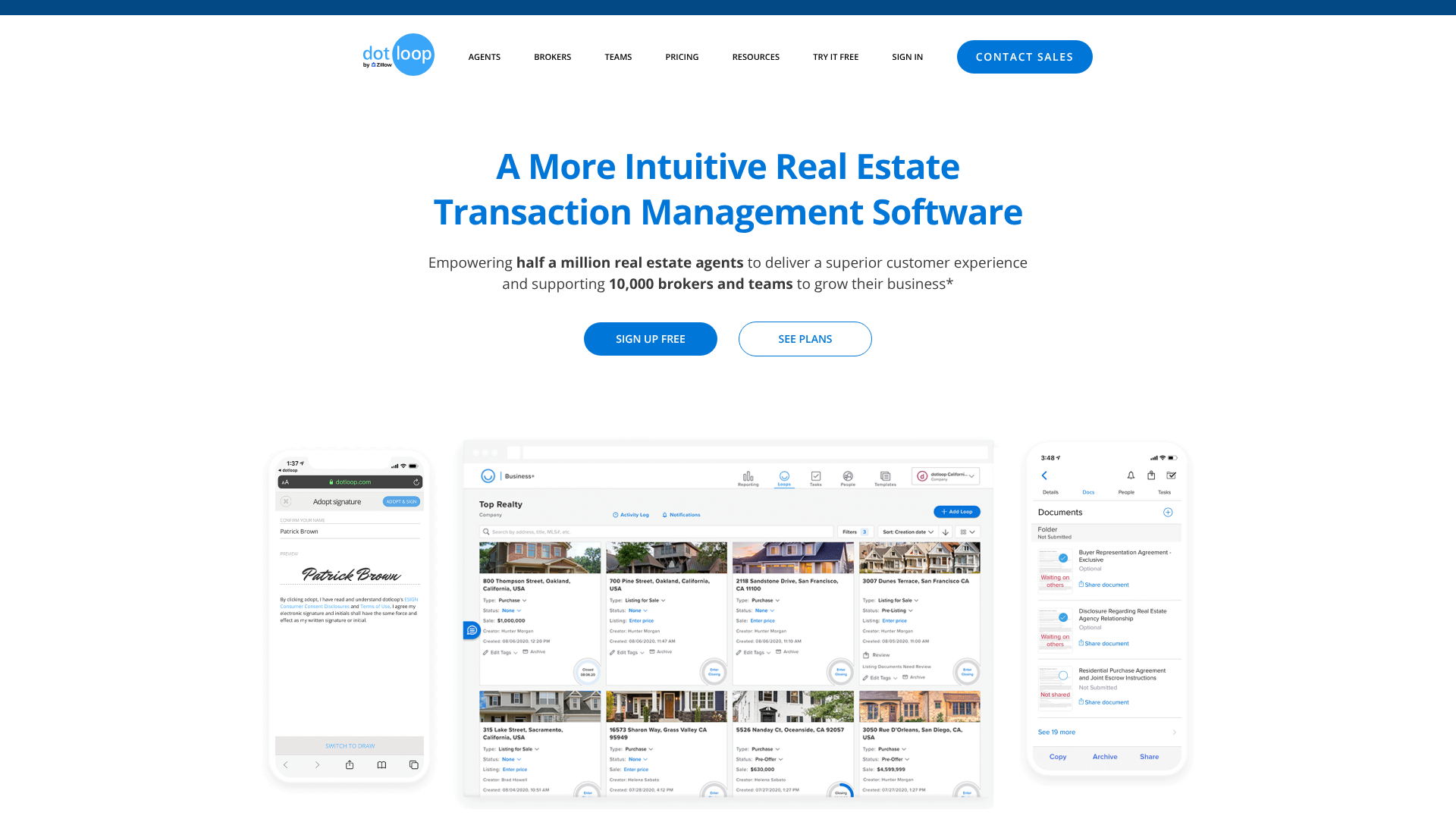
Dotloop is a cloud-based software platform designed specifically for the real estate industry. Founded in 2009 and later acquired by Zillow Group in 2015, its mission has always been to simplify the complex process of buying and selling property. The name itself comes from its central concept: closing the "loop" on a transaction by connecting all the people, documents, and tasks involved.
The platform operates around the idea of a "loop," which is a digital workspace for a single transaction (e.g., 123 Main Street). Within each loop, all relevant documents, contacts, and task lists are stored and managed. This structure provides a clear and organized container for everything related to a specific deal, preventing the disorganization that comes with managing multiple transactions via email and separate file folders.
Unlike generic document-signing tools, Dotloop is built with the real estate agent's workflow in mind. It includes features tailored to the industry, such as interactive document templates from real estate associations, automated compliance review processes, and real-time visibility for brokers to oversee their agents' transactions. This industry-specific focus is what makes it a go-to solution for individual agents, teams, and entire brokerages looking to modernize their operations.



The Core Features: What Does Dotloop Do?
To fully understand the dotloop uses, it's essential to break down its key features. These components work together to create a cohesive system that manages every stage of a real estate transaction.
Legally Binding eSignatures
At its heart, Dotloop is a powerful eSignature tool. It allows all parties—buyers, sellers, agents, and more—to sign documents from any device, anywhere in the world. The signatures are legally binding and comply with the U.S. Electronic Signatures in Global and National Commerce (ESIGN) Act, ensuring full legal validity.
The platform makes it easy to add signature and initial fields to any document, assign them to specific people, and track who has signed and who still needs to.
Document Management and Cloud Storage
Dotloop acts as a centralized, digital filing cabinet for every transaction. Users can upload PDFs, create documents from scratch using a text editor, or pull in interactive forms directly from their MLS or association library. Once inside a loop, documents can be edited, shared, and organized into folders. Every version of a document is saved, creating a complete history that can be accessed at any time.
This eliminates the need for physical storage and protects against lost paperwork.
Task Management and Automated Checklists
Keeping a transaction on track requires managing dozens of deadlines. Dotloop includes task management features that allow agents and transaction coordinators to create custom checklists for each deal. Tasks can be assigned to specific people in the loop, and due dates can be set. The system sends automatic reminders to ensure deadlines for inspections, financing, and other contingencies are not missed, which helps keep the deal moving forward smoothly.
Real-Time Collaboration Tools
The platform is built for collaboration. Instead of sending documents back and forth via email, all parties can view and interact with them inside the loop. There's an activity log that shows every action taken—who viewed a document, who signed it, and when. This transparency keeps everyone informed and reduces the constant back-and-forth communication, as agents and clients can see the status of documents in real time.
Brokerage Compliance and Audit Trails
For brokers, maintaining compliance is a top priority. Dotloop provides tools that give brokers complete oversight of their agents' transactions. They can create standardized review processes, requiring agents to submit completed document folders for approval. The system maintains a detailed audit trail for every document and transaction, recording every signature, edit, and share.
This makes audits simpler and helps brokerages reduce their legal risk.
How Dotloop Streamlines Real Estate Transactions from Start to Finish

To appreciate the impact of Dotloop, consider the traditional, paper-based real estate transaction. It often involves printing contracts, driving across town for signatures, scanning documents, and emailing large files that may or may not go through. Revisions mean starting the entire process over again. This method is slow, inefficient, and prone to human error.
Dotloop transforms this chaotic process into a streamlined, digital workflow. It starts the moment an agent decides to write an offer. Instead of printing a blank contract, the agent opens a new loop and pulls in the necessary purchase agreement form from their association's library. The form is interactive, allowing the agent to fill in the blanks directly on their computer or tablet.
Next, the agent shares the document with their client for signature. The client receives an email notification, clicks a link, and is guided through the signing process field by field. Once signed, the document is automatically updated in the loop, and the agent receives a notification. The offer can then be shared with the listing agent directly from Dotloop.
If there are counter-offers, negotiations can happen within the platform by editing and re-sharing the document, with each version tracked automatically. This entire process can take minutes instead of hours or days.
As the transaction progresses through escrow, all additional documents—disclosures, inspection reports, addendums—are added to the same loop. The agent, client, lender, and title company all have access to the information they need, when they need it. This central hub of activity ensures everyone is working from the most current documents and is aware of the deal's status, leading to a much smoother and faster closing.
Dotloop vs. The Competition: How Does It Compare?
While Dotloop is a major player in real estate transaction management, it's not the only tool available. Understanding how it stacks up against competitors, particularly general eSignature platforms like DocuSign, is crucial for agents deciding on their tech stack.
The most common comparison is Dotloop vs. DocuSign. The key difference lies in their scope. DocuSign is primarily an eSignature company that serves a wide range of industries.
It excels at getting documents signed electronically. However, it lacks the real estate-specific transaction management features that are central to Dotloop. DocuSign has a real estate-focused version, but Dotloop was built from the ground up for this industry.
Dotloop, on the other hand, is a complete transaction management system. The eSignature capability is just one piece of a larger puzzle that includes document storage, compliance review workflows, task management, and deep integrations with real estate forms. For an agent managing multiple deals, Dotloop provides a holistic view of their entire pipeline, something a pure eSignature tool cannot offer.
Other direct competitors in the real estate transaction management space include SkySlope and Form Simplicity. These platforms offer similar all-in-one functionality. The choice between them often comes down to brokerage partnerships, user interface preference, and specific feature sets. For example, some agents might find SkySlope's interface more intuitive, while others prefer Dotloop's "loop" concept for organizing transactions.
Here’s a quick breakdown of how Dotloop compares to DocuSign:
| Feature | Dotloop | DocuSign (Real Estate Plan) |
|---|---|---|
| Primary Focus | All-in-one real estate transaction management | eSignature with real estate features |
| Core Concept | The "Loop" (a workspace per transaction) | The "Envelope" (a package of documents for signing) |
| Document Editing | Robust, with interactive real estate forms | Basic editing, focuses on signature placement |
| Compliance Tools | Built-in workflows for broker review | More limited, often requires third-party integration |
| Task Management | Integrated checklists and deadline tracking | Not a core feature |
| Collaboration | Centralized workspace for all parties | Primarily focused on the signing process |
Ultimately, while DocuSign is an excellent tool for signing documents, Dotloop offers a more comprehensive solution designed to manage the entire lifecycle of a real estate deal.
Navigating the Platform: A Look at Dotloop's User Experience

The best software is only effective if people can actually use it. Dotloop's user interface (UI) is designed to be clean and relatively intuitive, especially for those familiar with modern web applications. The main dashboard provides a high-level overview of all active loops, organized by transaction status (e.g., Pre-Offer, Under Contract, Sold). This allows agents to see their entire pipeline at a glance and quickly access any deal.
When you click into a specific loop, you're presented with a workspace that contains three main sections: documents, people, and tasks. This logical layout makes it easy to find what you're looking for. Adding a new document is a simple process, with options to upload from your computer, a cloud service like Dropbox, or directly from a library of pre-loaded real estate forms.
For new users, there can be a slight learning curve, particularly when it comes to understanding the sharing permissions and the document editing tools. However, Dotloop provides extensive support resources, including video tutorials and a help center, to guide users through the process. For clients who may not be tech-savvy, the signing experience is designed to be as simple as possible. They receive a link via email and are walked through each required signature or initial field, minimizing confusion.
Pro Tip: Take advantage of Dotloop's document templates. You can create templates for common document packages (like a buyer's offer package or a new listing package) with all the necessary forms and pre-filled information. This can save you hours of repetitive work on each new transaction.
Expanding Your Tech Stack: Integrating Dotloop with Other Software
No software exists in a vacuum. A real estate agent's tech stack often includes a CRM, marketing tools, and accounting software. Dotloop's ability to integrate with these other systems is a key part of its value proposition. Integrations allow for a more connected workflow, reducing manual data entry and ensuring information is consistent across all platforms.
Dotloop offers a range of integrations through its API and partnerships. For example, many popular real estate CRMs, such as Follow Up Boss and Chime, can connect with Dotloop. This integration allows agents to start a loop directly from a contact record in their CRM, automatically pulling in client information and property details. This saves time and eliminates the risk of typos when creating new transaction documents.
Beyond CRMs, Dotloop also integrates with other tools that are part of the real estate ecosystem. For instance, it can connect with accounting software to streamline commission management or with other platforms to automate marketing campaigns for new listings. For brokerages, Dotloop's open API allows for custom integrations with proprietary back-office systems, providing a high degree of flexibility. Before committing to the platform, it's always a good idea to check their current list of integration partners to ensure it works with the other tools you rely on.
The Key Advantages: Benefits of Using Dotloop for Agents and Brokers
Adopting a platform like Dotloop offers numerous benefits that go beyond simply getting rid of paper. These advantages impact efficiency, client satisfaction, and a brokerage's bottom line.
Drastically Increased Efficiency
This is perhaps the most significant benefit. By digitizing and automating many of the manual tasks involved in a transaction, agents can get more done in less time. The ability to create, send, and sign documents in minutes rather than hours frees up agents to focus on what they do best: building relationships and serving clients.
Superior Client Experience
Today's consumers expect convenience and transparency. Forcing clients to print, sign, and scan documents feels outdated and cumbersome. Dotloop provides a modern, professional experience that allows clients to handle all paperwork from their phone or computer. The real-time visibility into the transaction status also helps manage client expectations and reduces anxiety.
Enhanced Compliance and Reduced Risk
For brokers, ensuring every transaction is compliant is a major responsibility. Dotloop's compliance features create a standardized and auditable review process. Every action is time-stamped and recorded, creating a comprehensive audit trail that is invaluable in the event of a dispute. This helps brokerages minimize their legal risk and maintain high standards across all agents.
Improved Team Collaboration
For real estate teams, Dotloop is a powerful collaboration tool. All team members, including agents, transaction coordinators, and administrative staff, can work together within the same loop. This ensures everyone is on the same page and has access to the latest information, which is critical for providing seamless service to clients.
A Practical Walkthrough: Using Dotloop for a Transaction (Step-by-Step)
Understanding the dotloop purpose is easier when you walk through a typical transaction. Here’s a step-by-step guide to how an agent would use the platform to manage a deal.
Step 1: Create a New Loop
It all starts with creating a loop. The agent logs into Dotloop and clicks "Create Loop." They'll be prompted to enter the property address or transaction name. Dotloop can often pull in property details automatically from public records, saving time. The agent will also assign a transaction type (e.g., Purchase, Listing) and status (e.g., Pre-Offer).
Step 2: Add Documents and Templates
Once the loop is created, the agent needs to add the necessary documents. They can upload existing PDFs or, more commonly, add interactive templates from their brokerage or association's library. For a purchase offer, this would include the purchase agreement, agency disclosures, and any relevant addenda.
Step 3: Invite People to the Loop
The agent then invites all relevant parties to the loop by entering their name and email address. This includes their clients (the buyers), the listing agent, and later, the lender and title officer. Each person is assigned a role (e.g., Buyer, Listing Agent), which determines their permissions within the loop.
Step 4: Prepare Documents for Signature
Before sending, the agent fills out the interactive forms with the offer details: price, terms, and dates. Then, they add signature, initial, and date fields to the documents and assign them to the appropriate people. For example, the buyer's signature fields are assigned to the buyer.
Step 5: Share and Manage Signatures
The agent shares the documents with their clients for signature. The clients receive an email and sign electronically. Once signed, the agent shares the completed offer with the listing agent. The activity log shows the agent exactly when the documents were viewed and signed, eliminating any guesswork.
Step 6: Submit for Compliance Review and Close
As the transaction progresses and more documents are executed, they are all stored in the loop. Once all documents are finalized, the agent organizes them into folders and submits them to their broker for compliance review directly through Dotloop. After the deal closes, the loop is archived, but it remains accessible for years, providing a permanent digital record of the transaction.
Common Hurdles: Challenges and Solutions When Using Dotloop
While Dotloop is a powerful tool, no software is perfect. Being aware of potential challenges can help users navigate them more effectively.
One common challenge is the learning curve for clients. While the signing process is designed to be simple, some clients, particularly those who are less comfortable with technology, may struggle or feel hesitant. * Solution: Proactive communication is key. Agents should walk their clients through the process beforehand, explaining how it works and assuring them of its security.
Dotloop also has a simple "Start Signing" button that guides users, and agents can even do a quick screen-share call for the first document to build confidence.
Another potential issue is the reliance on an internet connection. Since Dotloop is cloud-based, a stable internet connection is required to access and work on documents. This can be a challenge for agents working in rural areas with spotty service. * Solution: The Dotloop mobile app allows for some offline functionality.
Agents can download documents to their device ahead of time. Planning ahead and downloading key documents before heading to an area with poor connectivity can mitigate this issue.
Finally, some users report that the document editing tools can feel less robust than dedicated PDF editors like Adobe Acrobat. While Dotloop allows for text boxes, markups, and signature fields, complex edits can sometimes be clunky.
- Solution: For major document modifications, it's often best to make the changes in the source document (e.g., a Word file) and then re-upload it to Dotloop. For standard real estate forms, the built-in interactive fields should be sufficient for most needs.
What Real Users Are Saying: Dotloop Reviews and Testimonials
Customer reviews provide valuable insight into the real-world performance of a platform. Generally, Dotloop receives positive feedback from real estate professionals who praise its all-in-one nature and the efficiency it brings to their business.
Many users highlight the convenience of having everything—documents, signatures, communication, and compliance—in one place. They frequently mention how much time it saves compared to traditional methods. The integration with MLS and association forms is another commonly cited advantage, as it eliminates the need to hunt for the correct, up-to-date documents.
However, some criticisms do appear in user reviews. A portion of users feel the pricing can be steep, especially for individual agents who don't have a brokerage-provided account. Others have mentioned that customer support can sometimes be slow to respond. As one user on a Reddit discussion noted, the choice often depends on what your brokerage supports, as the enterprise-level features and support can differ significantly from the individual plans.
Overall, the sentiment is that Dotloop is a solid, industry-standard tool that successfully solves the core problem of transaction management. While it may have some minor drawbacks, its benefits in terms of organization, efficiency, and compliance generally outweigh them for most real estate professionals.
Frequently Asked Questions (FAQ)
Is dotloop the same as DocuSign?
No, they are not the same, although they have overlapping features. DocuSign is primarily an eSignature tool used across many industries. Dotloop is a comprehensive real estate transaction management platform built specifically for agents and brokers. It includes eSignatures but also adds document management, task checklists, and compliance workflows tailored to the real estate industry.
Are signatures on dotloop legally binding?
Yes, electronic signatures obtained through Dotloop are legally binding in the United States. The platform complies with the federal ESIGN Act and the Uniform Electronic Transactions Act (UETA), which grant electronic signatures the same legal status as handwritten signatures. Dotloop also provides a detailed audit trail for each signature to verify its authenticity.
How much does dotloop cost per month?
Dotloop offers several pricing tiers. There is a free version with limited functionality, allowing for a certain number of free transactions (or "loops"). The paid plan, Dotloop Premium, unlocks unlimited transactions and advanced features. Pricing can vary, so it is best to visit the official Dotloop website for the most current pricing information for individual agents.
Brokerage and team plans are priced differently and are typically customized.
Is dotloop owned by Zillow?
Yes, Dotloop was acquired by Zillow Group in 2015. It operates as a subsidiary of Zillow and continues to serve the real estate industry as a standalone platform. This acquisition has allowed for deeper integrations within the Zillow ecosystem of real estate tools.
Is dotloop safe to use?
Yes, Dotloop takes security seriously. The platform uses bank-grade encryption to protect data both in transit and at rest. It also includes security features like audit trails and secure access controls to ensure that only authorized individuals can view or modify transaction documents. They are committed to protecting the sensitive personal and financial information contained within real estate documents.
What is a dotloop document?
A Dotloop document is any digital file that exists within a "loop." This can be a PDF you've uploaded, an interactive form from an MLS or real estate association, or a document created using Dotloop's built-in text editor. These documents can be viewed, edited, shared, and signed by the parties involved in the transaction directly on the platform.
Final Thoughts
So, what is Dotloop used for? At its core, it’s used to bring order, efficiency, and transparency to the complex world of real estate transactions. It serves as a central command center for agents, brokers, and clients, transforming a traditionally paper-heavy process into a streamlined digital workflow. From collecting legally binding eSignatures to managing compliance, the platform addresses the key pain points that real estate professionals face daily.
While it's one of several options on the market, its deep focus on the real estate industry, comprehensive feature set, and user-friendly design have made it a standard for hundreds of thousands of agents. By centralizing documents, people, and tasks, Dotloop empowers agents to provide a better client experience and, ultimately, to close more deals with less friction.
If you're a real estate professional still juggling email attachments, scanners, and paper files, exploring a solution like Dotloop could be a significant step toward modernizing your business and reclaiming valuable time.