









What is Dotloop Used For? How Agents Streamline Real Estate Deals
The real estate industry is notorious for its mountains of paperwork, endless email chains, and the constant back-and-forth between agents, clients, lenders, and title companies. Managing a single transaction can feel like a full-time job in itself. This is the core problem that answers the question, what is dotloop used for? It's a platform designed to take that chaos and organize it into a single, collaborative online workspace.
Dotloop serves as a central hub for real estate transactions, replacing the need for printers, scanners, and overflowing file cabinets. It allows everyone involved in a deal—from the initial offer to the final closing—to edit, sign, and share documents digitally. This guide explains exactly how Dotloop works, its key features, and why it has become an essential tool for modern real estate professionals.
Quick Summary
- Centralized Transaction Management: Dotloop's primary purpose is to bring all parties and documents of a real estate deal into one secure online location, called a "loop."
- Legally Binding eSignatures: The platform provides built-in electronic signature functionality that is ESIGN and UETA compliant, making digital documents legally binding.
- Streamlined Collaboration: It allows real estate agents, clients, lenders, and other service providers to collaborate in real-time on documents, reducing delays and improving communication.
- Compliance and Storage: Dotloop helps brokerages maintain compliance with automated workflows and provides secure, cloud-based storage for all transaction documents, simplifying audits.
- Mobile Accessibility: With a dedicated mobile app, users can manage transactions, send documents for signature, and check on progress from anywhere, at any time.
What is Dotloop? The Core Purpose Explained
At its heart, Dotloop is a real estate transaction management and productivity platform. The fundamental dotloop purpose is to simplify the complex process of buying and selling property by moving the entire workflow online. It connects people, documents, and tasks in one place, creating a transparent and efficient experience for everyone involved.
The name "Dotloop" comes from its central concept: the "loop." A loop is a digital workspace created for a single transaction (e.g., 123 Main Street). Inside this loop, all the necessary documents, such as purchase agreements, disclosures, and addendums, are stored. All the people involved—the buyer's agent, seller's agent, clients, lender, and title officer—are invited into the loop.
This structure eliminates the common frustrations of traditional real estate deals. Instead of emailing different versions of a contract back and forth, everyone works on the same live document within the loop. When a signature is needed, a request is sent through the platform, and the client can sign from their computer or phone in minutes. This single source of truth ensures everyone is on the same page, reducing errors and speeding up the entire process.
A Deep Dive into Dotloop's Key Features
Understanding what does dotloop do requires a closer look at its specific features. These tools are designed to address every stage of a real estate transaction.
eSignatures and Document Editing
This is the cornerstone of Dotloop. The platform allows users to upload any document (PDFs are common) and add fields for signatures, initials, dates, and text. You can then send these documents to clients and other parties for their electronic signature. The signatures are legally binding and come with a detailed audit trail showing who signed, when, and where.
Interactive Document Templates
Brokerages and agents can create libraries of interactive templates for frequently used forms. Instead of starting from scratch every time, an agent can pull up a purchase agreement template that is already formatted with the necessary signature and data fields. This not only saves time but also ensures consistency and compliance across all transactions.



Task and Workflow Management
Dotloop allows you to create task lists and apply them to loops. A brokerage can create a standard "New Listing Workflow" with tasks like "Upload Signed Listing Agreement" and "Order Photos." As tasks are completed, they are checked off, giving brokers and transaction coordinators a clear view of where every deal stands.
Compliance Review and Storage
For brokers, compliance is critical. Dotloop provides a streamlined process for reviewing and approving documents. Agents submit documents for review within the loop, and the broker or compliance manager can approve them or return them with notes for correction. Once a transaction is closed, all documents are securely stored in the cloud, making audit preparation simple.
Mobile Application
Real estate doesn't happen behind a desk. Dotloop's mobile app for iOS and Android provides full functionality on the go. Agents can create loops, send offers, and request signatures directly from their phones, whether they're at an open house or meeting with a client.

How Dotloop Streamlines the Entire Real Estate Transaction
To truly grasp the dotloop uses, it's helpful to walk through the lifecycle of a typical home purchase. Without a tool like Dotloop, this process involves dozens of emails, phone calls, and in-person meetings.
-
The Offer: A buyer's agent drafts a purchase offer using a Dotloop template. They fill in the buyer's information and the offer details, then share it with the buyer for an eSignature. The buyer signs on their phone in minutes, and the agent immediately submits the offer to the listing agent by sharing the document within Dotloop.
-
Negotiations: The seller's agent receives a notification. They open the offer in their own Dotloop account, share it with the seller, and discuss a counteroffer. Instead of printing and scanning, they simply edit the terms directly on the document, initial the changes, and share it back. This back-and-forth can happen in hours instead of days.
-
Contract Execution: Once terms are agreed upon, all parties apply their final signatures. The document is now a fully executed contract, and a secure, final version is available to everyone in the loop. There's no confusion about which version is the correct one.
-
Due Diligence and Closing: The agent adds the lender, title company, and inspector to the loop. They can share the executed contract and other necessary documents securely. As inspection reports and loan documents come in, they are added to the loop, keeping everything organized and accessible for the closing.
Throughout this process, Dotloop provides a real-time activity log. Everyone can see when a document was viewed, signed, or shared, bringing a level of transparency that is impossible to achieve with email.
Dotloop vs. The Competition: How Does It Compare?

While Dotloop is a leader in the space, it's not the only option. The most common comparison is between Dotloop and DocuSign, but it's important to understand their fundamental differences.
Dotloop vs. DocuSign: This is a frequent question. DocuSign is primarily an electronic signature tool. It's excellent at getting documents signed, but that's where its core function ends.
Dotloop, on the other hand, is a complete transaction management system built specifically for real estate. It includes eSignatures, but also document storage, compliance workflows, task management, and collaboration features tailored to the industry.
Think of it this way: DocuSign is a tool you use for one part of the transaction. Dotloop is the platform where the entire transaction lives.
Dotloop vs. Other Real Estate Platforms (e.g., SkySlope, TransactionDesk): These are more direct competitors, as they also offer end-to-end transaction management. The choice often comes down to brokerage preference, user interface, and specific integrations. Dotloop is often praised for its clean, user-friendly interface and its "all-in-one" approach that keeps things simple for agents.
Here’s a quick breakdown:
| Feature | Dotloop | DocuSign Rooms for Real Estate | SkySlope |
|---|---|---|---|
| Primary Focus | All-in-one transaction management | eSignature with real estate features | Brokerage-focused compliance |
| User Interface | Often cited as simple and intuitive | Modern, but can be complex | Can feel dated to some users |
| Collaboration | Central "loop" for all parties | "Rooms" for collaboration | Strong agent-to-broker workflow |
| Mobile App | Fully functional mobile experience | Strong mobile app | Yes, available |
| Best For | Agents, teams, and brokerages wanting a single, easy-to-use platform | Users already familiar with the DocuSign ecosystem | Large brokerages focused heavily on compliance management |
Getting Started: How to Set Up Your Dotloop Account
Setting up a Dotloop account is a straightforward process. Whether you're an individual agent or part of a large brokerage, the initial steps are similar.
-
Visit the Dotloop Website: Navigate to the Dotloop homepage and choose the sign-up option. You'll be asked to select your role (e.g., Agent, Broker, Client).
-
Choose Your Plan: Dotloop offers different pricing tiers. There is a free version with limited functionality, but most professionals will opt for Dotloop Premium, which includes unlimited loops and advanced features. Brokerages will choose a business plan. For the most current information, it's best to visit the official website for pricing details.
-
Enter Your Information: You'll provide your name, email address, and create a password. You will also need to enter your real estate license information and select your association/MLS to link your account with local forms.
-
Complete Your Profile: Once your account is created, take a few minutes to complete your profile. Add a professional headshot, your contact information, and brokerage details. This information will automatically populate on documents you create, saving you time later.
-
Set Up Integrations: In your account settings, you can connect Dotloop to other tools you use, like Google Drive or Dropbox, to easily import and export documents.
Navigating the Dotloop Dashboard: A Beginner's Tour
When you first log in to Dotloop, the dashboard presents a clean overview of your business. Understanding the layout is key to using the platform efficiently.
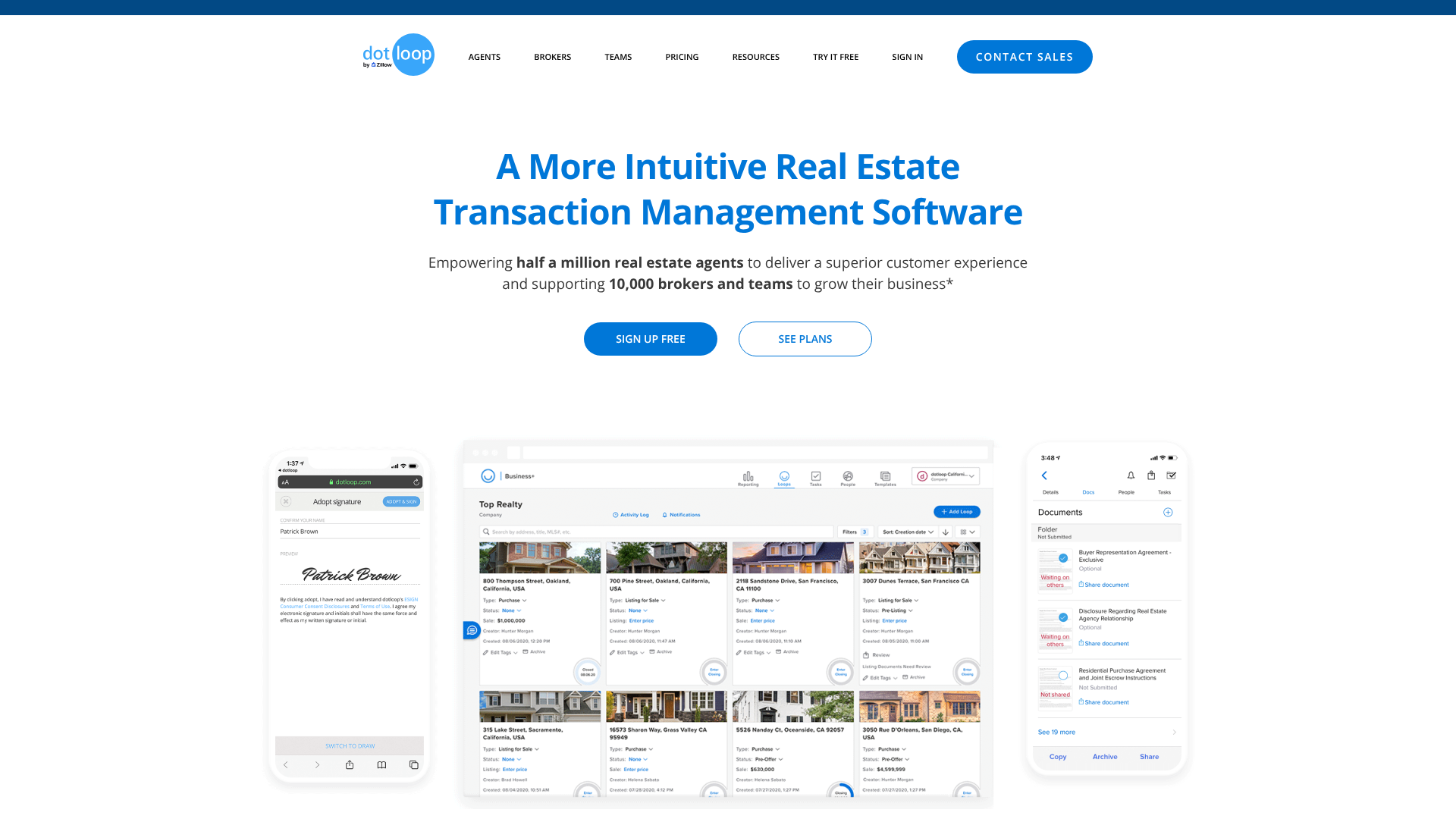
The main screen is dominated by your "loops." Each loop represents one transaction and is displayed as a card with the property address, photo, and current transaction status (e.g., In-Progress, Sold, Leased). You can sort and filter your loops to quickly find what you need.
On the top navigation bar, you'll find several key sections:
- Loops: This is your home screen, showing all your transaction workspaces.
- People: This section acts as your address book. It stores the contact information for all your clients, cooperating agents, and service providers.
- Templates: This is where you or your brokerage will store blank copies of contracts and forms. You can organize them into folders for easy access.
- Tasks: The tasks tab gives you an overview of all your to-do items across all your loops, helping you stay on top of your deadlines.
Clicking into a specific loop takes you to the transaction's workspace. Here, you'll see a list of all the documents, the people involved, and the task list for that specific deal. It's a simple, organized view that keeps everything related to one property in one place.
The Power of Collaboration: Working with Others in Dotloop
Dotloop's true power lies in its collaborative features. It breaks down the communication silos that plague traditional real estate transactions.
When you add someone to a loop, you assign them a role (e.g., Buyer, Seller, Lender). This role determines their permissions—what they can see and do within the loop. For example, a client can view and sign documents you share with them, but they can't edit the contract terms or see private conversations between you and your broker.
Sharing a document is as simple as clicking the "Share" button and selecting the recipient. You can choose their permission level, such as "View Only," "Can Sign," or "Can Edit in Private." When you share a document for signature, the recipient gets an email notification with a secure link. They don't even need a Dotloop account to sign; they can simply click the link and follow the prompts.
This system creates a seamless flow of information. The lender can access the executed contract as soon as it's signed. The title company can see all the necessary addendums. The client can log in anytime to review the documents they've signed.
This transparency builds trust and keeps the deal moving forward.
Pro Tip: Use the "Add Note" feature within a document to communicate with the other agent. You can tag them in a note to ask a question about a specific clause, keeping your conversation tied directly to the document instead of lost in a separate email thread.
Extending Functionality: Integrating Dotloop with Your Tech Stack
No software exists in a vacuum. Dotloop integrates with a wide range of other real estate tools to create a more connected workflow. This means less manual data entry and a smoother transfer of information between the systems you use every day.
Common integrations include:
- CRM Systems: Connect Dotloop to your Customer Relationship Management (CRM) software like LionDesk or Follow Up Boss. This allows you to start a loop directly from a contact record in your CRM, automatically pulling in the client's information.
- Cloud Storage: Link your Dotloop account to services like Google Drive, Dropbox, and OneDrive. This makes it easy to pull documents into a loop or back up your completed transaction files to your preferred storage provider.
- Back Office and Accounting Software: Many brokerages integrate Dotloop with their accounting systems. This allows transaction data to flow directly from Dotloop to the back office for commission processing and financial reporting.
These integrations are managed through the Dotloop API and a marketplace of third-party apps. By connecting your tools, you can automate repetitive tasks and ensure your data is consistent across your entire tech stack.
Best Practices for Mastering Dotloop
Getting an account is easy, but becoming a Dotloop power user takes a bit of practice. Here are some best practices to get the most out of the platform:
-
Create and Use Templates: The single most effective way to save time is to use templates. Work with your broker to create templates for every common document type, complete with pre-placed signature and date fields. This turns a 15-minute task into a 2-minute one.
-
Organize Your Loops with Folders: Within a loop, you can create folders to organize your documents. Use folders like "Pre-Offer Docs," "Executed Contract," and "Closing Docs" to keep things tidy and easy to find, especially in complex transactions.
-
Standardize Your Naming Conventions: Decide on a consistent way to name your loops (e.g., "123 Main St – Buyer – Smith") and your documents. This makes searching for files much easier and keeps your dashboard clean.
-
Use Task Lists for Every Transaction: Don't rely on memory. Apply a task list template to every new loop to ensure you never miss a deadline or a required document. This is especially crucial for maintaining compliance.
-
Educate Your Clients: Take a few minutes at the beginning of your relationship to explain to your clients how Dotloop works. Show them how easy it is to sign documents and let them know they'll be receiving emails from the platform. A little education upfront prevents confusion later.
Real-World Impact: Dotloop Success Stories
While individual results vary, the benefits of adopting a tool like Dotloop are often significant. Here are a couple of common scenarios illustrating its impact.
Case Study 1: The Busy Team
A real estate team of five agents was struggling to keep track of 20+ active transactions. Their transaction coordinator was overwhelmed with chasing signatures and checking documents for errors. After implementing Dotloop for Teams, they created standardized workflow templates. The TC could now see the status of every deal from a single dashboard, agents could get contracts signed while in the field, and the managing broker could perform compliance reviews without needing physical files.
They reported reducing their average contract-to-close time by three days.
Case Study 2: The Tech-Forward Solo Agent
An individual agent wanted to provide a superior client experience. They used Dotloop to create a completely paperless process. Clients were impressed by the ability to review and sign offers from their smartphones within minutes of discussing them. The agent used the platform's transparency to keep clients informed, giving them access to view all relevant documents in the loop.
This modern, efficient process led to more five-star reviews and a higher referral rate.
Frequently Asked Questions About Dotloop
Here are answers to some of the most common questions people have about Dotloop.
Is dotloop the same as DocuSign?
No, they are different. DocuSign is primarily an electronic signature tool used across many industries. Dotloop is a comprehensive real estate transaction management platform built specifically for agents and brokers. It includes eSignatures as one of its core features but also offers document management, compliance workflows, and collaboration tools tailored to real estate deals.
Is dotloop only for real estate?
Yes, Dotloop is designed specifically for the real estate industry. Its features, workflows, and integrations are all built to meet the unique needs of real estate agents, brokers, transaction coordinators, and their clients. While other professionals could technically use it for eSignatures, its true value is unlocked within the context of a property transaction.
Is dotloop legally binding?
Yes. The electronic signatures captured through Dotloop are legally binding in the United States. They comply with the federal ESIGN Act and the Uniform Electronic Transactions Act (UETA). The platform provides a complete audit trail for every signed document, which serves as proof of the signature's validity.
Is dotloop owned by Zillow?
Yes, Dotloop was acquired by Zillow Group in 2015. It operates as a subsidiary of Zillow and continues to serve the real estate industry as a standalone platform.
Is dotloop free to use?
Dotloop offers a free plan with limited functionality, allowing users to handle a small number of transactions. However, most real estate professionals subscribe to Dotloop Premium to get unlimited transactions and access to all the platform's features. Brokerages and teams purchase business-level plans with additional compliance and management tools.
Can I use dotloop on my phone?
Absolutely. Dotloop has a fully-featured mobile app for both iOS and Android devices. You can manage nearly every aspect of your transactions from your phone or tablet, including creating loops, editing documents, sending for signature, and tracking progress.
Is dotloop safe to use?
Yes, Dotloop uses bank-grade security and encryption to protect your data and documents. It provides a more secure way to handle sensitive information compared to sending documents as email attachments, which can be vulnerable to interception.
Final Thoughts: Is Dotloop Right for Your Business?
For real estate professionals tired of chasing paperwork, managing chaotic email threads, and worrying about compliance, Dotloop offers a powerful solution. It centralizes the entire transaction process, from the first form to the final closing document, into a single, easy-to-use platform. The core dotloop uses revolve around saving time, reducing errors, and improving the overall experience for both agents and their clients.
By embracing a digital workflow, you can close deals faster, stay organized on the go, and provide the modern, seamless service that today's consumers expect. If you're looking to streamline your operations and focus more on what you do best—helping people buy and sell homes—then exploring a tool like Dotloop is a logical next step for your business.