









How Much Does Dotloop Cost? 2026 Pricing Guide for Agents & Brokers
Understanding how much Dotloop costs is a critical step for any real estate professional looking to streamline their transaction management. The platform is designed to bring agents, clients, and transaction coordinators into a single digital workspace, but the price depends heavily on your role and business size. For most individual agents, Dotloop Premium costs $34.99 per month, with a discount available for annual subscriptions, bringing the effective monthly rate down.
This pricing structure provides a clear path for agents to access unlimited transactions and powerful workflow tools. However, the cost of Dotloop changes for teams and brokerages, who require more advanced features like compliance dashboards and custom branding. These higher-tier plans operate on a custom pricing model, tailored to the specific needs of the organization.
This guide breaks down every aspect of Dotloop's pricing, from the free plan's limitations to the enterprise-level features for large brokerages. We'll explore the value you get at each price point to help you decide if it's the right investment for your real estate business.
What to Know
- Individual Agent Pricing: The standard Dotloop Premium plan for individual agents is priced at $34.99 per month. Opting for an annual plan reduces the overall cost, typically saving you around 15-20%.
- Free Version Available: Dotloop offers a free, limited account that allows you to participate in up to 10 transactions, or "loops." This plan is ideal for new agents or those who only handle a few deals per year, but you cannot initiate your own transactions from scratch.
- Custom Pricing for Teams & Brokerages: The
dotloop pricingfor teams and brokerages is not standardized. These plans, Dotloop for Teams and Business+, require you to contact their sales department for a custom quote based on your size and feature requirements. - Core Value Proposition: The primary benefit of Dotloop is its all-in-one nature. It combines eSignatures, document storage, compliance tracking, and collaboration tools into a single platform, eliminating the need for multiple disparate software subscriptions.
What is Dotloop and Who Is It For?
Dotloop is a cloud-based real estate transaction management platform designed to simplify the entire process of a property deal, from the initial offer to the final closing. It centralizes all documents, communications, and signatures into a single, collaborative online workspace known as a "loop." Each loop acts as a digital hub for a specific transaction, containing every form, contract, and disclosure.
This system allows all parties involved—agents, buyers, sellers, lenders, and title officers—to view, edit, sign, and share documents in real-time. The goal is to eliminate the endless back-and-forth of emails, faxes, and in-person signings that traditionally slow down real estate deals. By keeping everything in one place, it enhances transparency and drastically improves efficiency.
Dotloop serves three primary audiences within the real estate industry, each with distinct needs:
- Individual Real Estate Agents: Solo agents are the largest user base. They need a reliable way to manage their deals, collect signatures from clients, and keep their paperwork organized and compliant. For them, Dotloop replaces a messy mix of email, PDF editors, and separate e-signature services.
- Real Estate Teams: Teams of 2 to 50 agents require more than just individual transaction management. They need tools for collaboration, brand consistency across documents, and oversight from a team lead or administrator. Dotloop's team plan provides shared templates and a central dashboard to track the team's collective progress.
- Brokerages: A brokerage's primary concern is compliance and risk management. They need to ensure every agent is following legal and company procedures. The brokerage-level plan (Business+) gives them a top-down view of all transactions, with customizable compliance review workflows, detailed reporting, and tools for onboarding new agents.
A Detailed Breakdown of Dotloop Pricing Plans (2026)
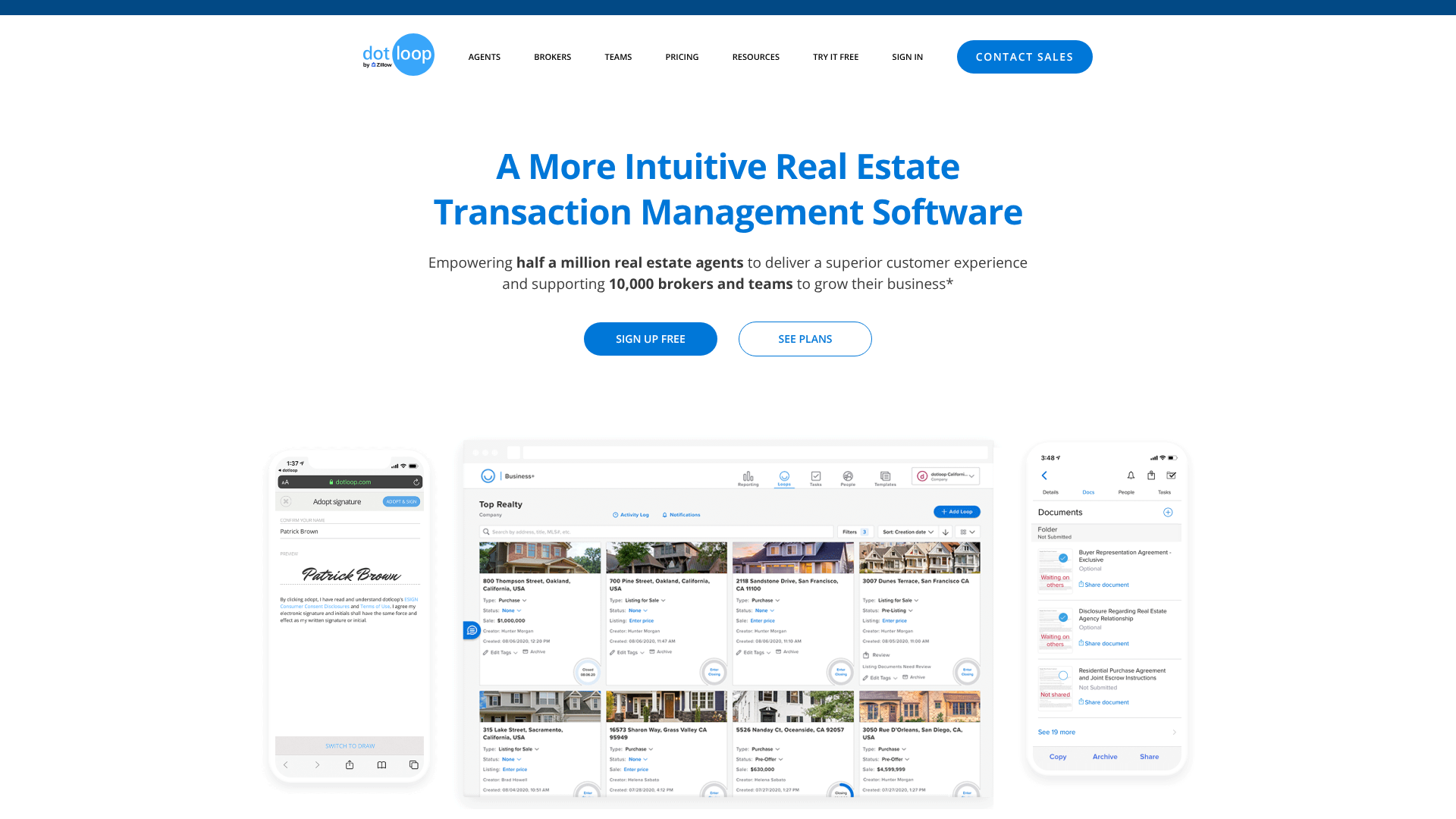
Navigating dotloop fees requires understanding the different tiers designed for various levels of the real estate business. The structure is designed to scale with you, from your very first deal to managing a multi-office brokerage. Here’s a close look at what each plan offers and who it’s built for.



Dotloop Free Plan: A Starting Point
The Dotloop Free plan is best understood as a way to participate in transactions, not create them. If another agent invites you to a loop, you can use this free account to sign documents, upload files, and communicate with others in the loop. It's a functional entry point for those new to the industry or agents who work primarily on the buyer's side and are often invited to loops by listing agents.
Its main limitation is significant: you cannot create your own loops from scratch. This means you can't use it to manage your own listings or initiate a transaction. It allows for participation in up to 10 loops, which is sufficient for part-time agents or those just getting started. It provides access to the core e-signature and document storage features but lacks the automation and management tools of the paid plans.
Dotloop Premium: The Standard for Individual Agents
This is the flagship product for most real estate agents. Priced at $34.99 per month or a discounted $344 per year (which works out to about $28.67 per month), Dotloop Premium unlocks the full potential of the platform for a solo user. The key upgrade is the ability to create an unlimited number of loops.
With Premium, you get a full suite of tools designed to manage your entire workflow:
- Unlimited Transactions: Manage as many deals as you can handle without any caps.
- eSignatures: Secure and legally binding electronic signatures with a complete audit trail.
- Task Templates: Create checklists for different transaction types (e.g., "New Listing Checklist") to ensure no step is missed.
- Document Editor & Storage: Edit PDFs, split or merge documents, and store everything securely in the cloud.
- Mobile App: A powerful mobile app for iOS and Android lets you manage deals and get signatures from anywhere.
- Integrations: Connects with other real estate tools like Zillow Premier Agent and various CRMs.
This plan is the logical choice for any full-time agent who manages their own transactions and needs a professional, efficient system.
Dotloop for Teams: Collaboration and Oversight
When you move from a solo agent to a team, your needs change. The cost of dotloop for teams reflects this shift towards collaborative features. This plan does not have public pricing; you must request a custom quote. Based on industry reports, pricing often starts around $149 per month for a small team and increases with size.
Key features that differentiate the Teams plan include:
- Team Dashboard: A central hub to view all team transactions at a glance.
- Custom Branding: Add your team's logo and branding to documents and emails for a professional look.
- Shared Templates: Ensure every team member uses the same compliant clauses and checklists.
- Advanced Reporting: Track team performance, transaction volume, and other key metrics.
- Lead Routing: Assign incoming leads from sources like Zillow directly to team members within Dotloop.
This plan is built for real estate teams who need to standardize their processes and provide their team leader or admin with oversight capabilities.
Dotloop Business+ (Brokerage Plan): Compliance and Scalability
For large teams and brokerages, Dotloop Business+ is the enterprise-level solution. Like the Teams plan, pricing is entirely custom. This plan is focused heavily on risk management, compliance, and operational efficiency across an entire organization.
Exclusive features of Business+ include:
- Broker Compliance Dashboards: Create multi-level compliance review stages to ensure every document is checked by the necessary staff (e.g., an admin, then a compliance officer).
- Customizable Workflows: Build automated workflows that guide agents through the exact steps required by the brokerage.
- API Access: Integrate Dotloop deeply with other brokerage software, such as accounting systems or proprietary CRMs.
- Agent Onboarding & Management: Easily add or remove agents from the system and control their permissions.
This is the essential tool for brokers of record who are ultimately responsible for every transaction conducted under their license.
Dotloop Pricing Plans at a Glance
| Feature | Free Plan | Premium Plan | Teams Plan | Business+ (Brokerage) |
|---|---|---|---|---|
| Price | $0 | $34.99/month | Custom Quote | Custom Quote |
| Transaction Limit | 10 Loops (Participation Only) | Unlimited | Unlimited | Unlimited |
| Create New Loops | No | Yes | Yes | Yes |
| eSignatures | Yes | Yes | Yes | Yes |
| Task Templates | No | Yes | Yes | Yes |
| Team Dashboard | No | No | Yes | Yes |
| Custom Branding | No | No | Yes | Yes |
| Compliance Workflows | No | Basic | Basic | Advanced & Customizable |
| API Access | No | No | No | Yes |
Are There Any Hidden Dotloop Fees to Consider?
When budgeting for any software, it's wise to look beyond the monthly subscription fee. While Dotloop's pricing is generally straightforward for individual agents, there can be additional dotloop fees or costs, particularly for larger teams and brokerages that require more hands-on setup and support.
One of the most common additional costs is a one-time setup and training fee. This is not typically applied to individual Premium subscribers, who can get started on their own using online resources. However, for Teams and Business+ clients, Dotloop often charges for the implementation process. This fee can range from a few hundred to over a thousand dollars, with some sources citing a figure around $600.
This covers the work of a Dotloop specialist who helps set up the brokerage's custom workflows, branding, and agent accounts, and provides initial training to ensure smooth adoption.
Another potential cost relates to API access and integrations. While the Premium plan offers some standard integrations, brokerages on the Business+ plan may need to use Dotloop's API to connect it with their custom-built or third-party accounting, CRM, or marketing software. Accessing and using the API can sometimes involve additional developer add-on fees, which could be an ongoing annual expense. This is an advanced need and only applies to organizations with sophisticated tech stacks.
Finally, it's important to consider the cost of any third-party services you might integrate with Dotloop. For example, if you connect Dotloop to a premium CRM or an accounting platform, the subscription fees for those separate services are your own responsibility. Dotloop acts as the central hub, but the costs of the spokes connected to it are separate. For most individual agents, these hidden costs are not a concern; the monthly or annual Premium fee is all they will ever pay.
Pro Tip: Before committing to a Teams or Business+ plan, ask your sales representative for a complete quote that explicitly lists any one-time setup, training, or implementation fees. This ensures there are no surprises after you sign the contract.

Key Features & Benefits: What Your Subscription Gets You
Understanding the cost of dotloop is only half the equation. The other half is recognizing the value delivered through its features. Dotloop isn't just an e-signature tool; it's a comprehensive system built to manage the complex lifecycle of a real estate transaction. Here are the core features and the tangible benefits they provide to agents and brokers.
The "Loop": Your Digital Transaction Room
The entire Dotloop ecosystem revolves around the concept of a "loop." A loop is a collaborative, digital workspace for a single transaction. Instead of having documents scattered across email threads and different folders, the loop centralizes everything. All contracts, disclosures, addendums, and communications related to one property deal live inside its dedicated loop.
This creates a single source of truth. Everyone involved—the agent, client, co-op agent, lender—can be invited into the loop with specific permissions. This transparency reduces confusion, minimizes delays caused by lost documents, and gives clients a clear view of the process, which enhances their experience.
Legally Binding eSignatures
At its core, Dotloop provides a secure and legally binding e-signature solution that complies with the federal ESIGN Act and the Uniform Electronic Transactions Act (UETA). This allows you and your clients to sign documents from any device, anywhere in the world. This feature alone can save hours of driving to meet clients for wet signatures.
Beyond convenience, Dotloop's e-signature feature includes a detailed audit trail. Every action taken on a document—viewing, signing, editing—is time-stamped and recorded. This creates a comprehensive log that provides an extra layer of legal protection and compliance, proving exactly who did what and when.
Document Management and Storage
Real estate is a paper-intensive business, and Dotloop is built to tame the chaos. You can upload any PDF and use the built-in editor to add text, checkmarks, and signature fields. The platform also offers a vast library of state and local association forms that are automatically updated to ensure you're always using the most current version.
Features like document splitting and merging are invaluable. For example, you can easily extract a single page from a 100-page inspection report to create an addendum. All documents are stored securely in the cloud with unlimited storage, meaning you have a permanent, organized digital archive of every closed deal for compliance purposes.
Compliance and Reporting Tools
For brokers and team leads, this is arguably the most critical feature set. Dotloop provides powerful dashboards that allow for complete oversight of every transaction. You can create customized review workflows, ensuring that an admin or compliance manager reviews and approves every contract before it's sent out.
This system flags missing signatures or incomplete fields, dramatically reducing errors and minimizing legal risk. The reporting tools offer insights into agent productivity, deal volume, and transaction timelines. This data helps brokers identify top performers, spot potential bottlenecks, and make informed decisions to grow their business.
Mobile Accessibility
Real estate doesn't happen behind a desk. Dotloop's mobile app for iOS and Android is a full-featured version of the desktop platform. You can create loops, prepare offers, send documents for signature, and check the status of a deal while you're on the go—whether you're at a property showing or waiting for a client.
This mobility is crucial for modern agents who need to be responsive. The ability to get a contract signed and submitted within minutes of a client's decision can be the difference between winning and losing a competitive offer.

Pros and Cons of Dotloop's Pricing and Platform
No software is perfect for everyone. While Dotloop is a leader in the real estate transaction space, it's important to weigh its strengths and weaknesses to determine if its pricing and features align with your specific needs.
The Pros: Where Dotloop Shines
- All-in-One Solution: Dotloop's greatest strength is its integration of e-signatures, document management, and compliance into a single, cohesive platform. This eliminates the need to pay for and learn multiple different tools, saving both money and time.
- Industry Adoption: Because Dotloop is so widely used, collaborating with other agents, lenders, and title companies is often much smoother. Many professionals already have a Dotloop account, which speeds up the process of sharing and signing documents.
- User-Friendly Interface: For its complexity, the platform is remarkably intuitive. The "loop" concept is easy to grasp, and the step-by-step process for preparing and sending documents is straightforward for both agents and their clients.
- Robust Compliance Features: Especially for brokerages, the ability to create custom review stages and track every action within a transaction is invaluable for risk management. The detailed audit trail provides a strong defense in case of any disputes.
The Cons: Potential Downsides to Consider
- Limited Free Plan: The free version is more of a trial or a participation tool than a functional solution for an active agent. The inability to create your own loops is a major restriction that forces any serious agent to upgrade.
- Cost for Basic Needs: If your primary need is just for e-signatures and you don't require the full transaction management suite, the
cost of dotloopcan seem high compared to simpler alternatives like DocuSign's personal plan. - Learning Curve for Advanced Features: While the basics are easy, mastering the advanced workflow automation and compliance setup for a brokerage can have a steep learning curve. This is often why a paid setup and training session is recommended for Business+ clients.
- Lack of Transparent Pricing for Teams: The requirement to get a custom quote for team and brokerage plans can be a frustrating lack of transparency for those trying to budget and compare options quickly. You can't simply see the price on the website.
How to Choose the Right Dotloop Plan for Your Business
Selecting the right Dotloop plan comes down to a clear assessment of your current business volume, your team structure, and your future growth goals. Using the wrong plan can mean either overpaying for features you don't need or being constrained by limitations that slow you down. Here’s a simple framework to help you decide.
For the Solo Agent: Free vs. Premium
If you're a brand new agent or a part-time agent who expects to close fewer than 10 deals in a year, starting with the Free Plan is a no-risk way to familiarize yourself with the platform. It allows you to participate when other agents invite you, which is a common scenario. However, the moment you get your own listing or need to write an offer for a buyer from scratch, you'll need to upgrade.
Any full-time solo agent should go directly to the Premium Plan. The ability to create unlimited loops is non-negotiable for a professional who is actively building their business. The monthly fee is a standard cost of doing business, and the efficiency gains from task templates and a streamlined workflow will easily pay for the subscription by saving you hours on each transaction.
For the Growing Team: Premium vs. Teams
A small team of two or three agents might be able to get by with each member having their own Premium account. However, you'll quickly run into inefficiencies. You won't have a central view of all team deals, you'll have to manually share templates, and your branding will be inconsistent.
You should upgrade to the Dotloop for Teams plan when:
- You hire an administrator who needs to oversee all transactions.
- You want to enforce the use of specific, compliant document templates and checklists.
- You need a central dashboard to track the team's sales pipeline and performance.
- Consistent team branding on all client-facing communication becomes a priority.
For the Established Brokerage: Teams vs. Business+
The line between a large team and a small brokerage can be blurry. The Dotloop for Teams plan works well for organizations that are primarily focused on sales collaboration. However, the moment your primary concern shifts to legal compliance and operational scalability, you need the Business+ plan.
Make the move to Business+ when:
- You need multi-level document review (e.g., an admin checks for completeness, then a broker checks for compliance).
- You need to create and enforce complex, automated workflows that guide agents through every step of a transaction according to company policy.
- You want to integrate Dotloop with other core business systems like accounting software via an API.
- You are actively onboarding new agents and need a scalable system to manage their accounts and training.
Frequently Asked Questions (FAQ)
Here are answers to some of the most common questions about Dotloop's cost, functionality, and place in the market.
Can I use dotloop for free?
Yes, you can use Dotloop for free, but the free account is quite limited. It allows you to join up to 10 "loops" (transactions) that have been created by other agents. This means you can sign, view, and manage documents within those transactions. However, the free plan does not allow you to create your own loops, making it unsuitable for agents who need to manage their own listings or initiate offers.
What is better, DocuSign or dotloop?
This depends on your needs. DocuSign is a general-purpose electronic signature tool that can be used across any industry. Dotloop is a specialized, all-in-one transaction management platform built specifically for the real estate industry. If you only need to get documents signed, DocuSign may be a simpler, cheaper option.
If you want a complete system to manage the entire real estate transaction workflow, including compliance, document storage, and collaboration, Dotloop is the more comprehensive solution.
Do all realtors use dotloop?
No, not all realtors use Dotloop, but it is one of the most popular transaction management platforms in the United States. Many agents and brokerages use it, giving it a large network effect. However, there are several strong competitors in the market, including SkySlope, Form Simplicity, and TransactionDesk. Some agents also use DocuSign in combination with other tools for document management.
Is dotloop owned by Zillow?
Yes, Dotloop was acquired by Zillow Group in 2015. This acquisition has allowed for deeper integrations between Dotloop and other Zillow products, such as Zillow Premier Agent, which helps agents manage leads and transactions in a more connected way. Despite the acquisition, Dotloop continues to operate as a distinct platform available to all real estate professionals.
How much is a subscription to dotloop?
A subscription to Dotloop's standard plan for individual agents, called Dotloop Premium, costs $34.99 per month. There is also an annual subscription option available for $344, which offers a discount over the monthly rate. Pricing for teams and brokerages is customized and requires contacting the Dotloop sales team for a quote.
Is dotloop legally binding?
Yes, signatures obtained through Dotloop are legally binding. The platform complies with the U.S. Electronic Signatures in Global and National Commerce Act (ESIGN) and the Uniform Electronic Transactions Act (UETA), which provide the legal framework for the validity of electronic signatures and records. Dotloop also provides a detailed audit trail for every document to further support its legal standing.
Final Thoughts: Is the Cost of Dotloop Worth It?
After breaking down the various plans and features, the question remains: is the investment in Dotloop a worthwhile expense for your real estate business? For the vast majority of active real estate professionals, the answer is a resounding yes. The platform is purpose-built to solve the specific challenges of managing complex, document-heavy transactions.
The cost of dotloop for a solo agent on the Premium plan is a minor business expense when weighed against the hours saved on administrative tasks. The ability to prepare, send, and manage contracts from anywhere, combined with automated checklists and unlimited storage, directly translates to more time spent on client-facing, income-generating activities. It transforms a chaotic process into a streamlined, professional workflow.
For teams and brokerages, the value shifts from individual efficiency to collaborative power and risk management. The investment in a custom plan provides the essential oversight needed to ensure compliance, maintain brand consistency, and scale operations effectively. While the initial setup and subscription fees are higher, they are a critical defense against the far greater cost of a compliance violation or a lawsuit. If you're ready to move beyond messy email chains and disorganized folders, you can explore the plans and features directly on the Dotloop website.